Monitoring Website Traffic
Advanced Search Engine Optimization Services
Are you looking to expand your presence online but do not have the time to do it yourself? Then ITC has an answer for you with the Insurance Website Builder Advanced SEO Services Plan. With this new plan, you will have access to your very own Search Engine Optimization Coordinator that will assist you with all aspects of your search engine and social networking marketing campaign. Whether it is setting up your blogs, posting on your Facebook page or submitting press releases on your behalf; we will make it happen. Each week your SEO specialist will promote your site on your behalf all over the Internet, with as much or as little input from you as desired.
Our current customers have enjoyed top placement on Google, Yahoo and Bing for most of their main keyword phrases. To join them, contact Mark Goldsberry today at 800-383-3482 Extension 160.
Monitoring Your Webpage Traffic
Just as you monitor the leads where your business is coming from, you should monitor the traffic on your website. Insurance Website Builder makes it easy to do so with our web statistics feature, through Google Analytics.
Google Analytics is a free service offered by Google that generates detailed information on how people find your site and navigate through it. A great deal of information is provided about your website in Google Analytics. In this newsletter we will just cover some of the basics.
When you initially sign into Google Analytics, you will see the Dashboard, as pictured below.
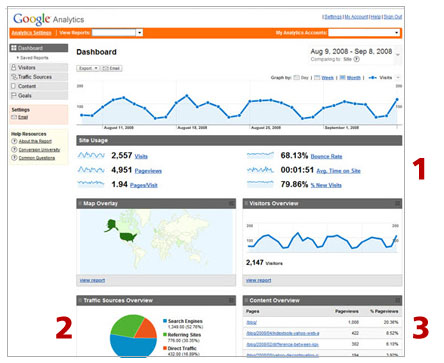 1. Site Usage.
 This section shows the number of interactions with your website. By default, the report shows traffic for the last 30 days.
- Visits is the number of interactions with your website
- The Bounce Rate is the percentage of the visits in which
the person instantly left your site
- Pageviews indicate how many pages of your site were
viewed
- Pages/Visit are the average number of pages each person
visited when they came to your site
- Average Time on Site tells you how long people stayed on
your site
- % of New Visits show how many people
visited your site for the first time
2. Traffic Sources Overview. Here you can see where your traffic is coming from.
-
Direct traffic includes visitors that typed in your webpage
address or clicked on a bookmark
-
Visitors that were referred to your site from other sites
are counted in Referring Sites
-
People that found your site from doing a query on a search
engine, such as Google, Yahoo, MSN, and so on are counted
under Search Engines
3. Content Overview. Seeing what pages your visitors are looking at can help you understand what is interesting to your visitors and help you prioritize where you should spend your time updating the content. Be sure to include call to actions on these pages so when your visitor is ready to start the buying process, they know where to go to get a quote.
How do I setup web statistic tracking on my website?
To learn more about Google Analytics, watch their online video
Beginning Analytics: Interpreting and Acting on Your Data
Add Live Chat to Your Website
Provide Support is an online service that allows you to chat with your website visitors. Live chat enables you to give instant online customer support through your website and proactively sell.