TurboRater Monthly Newsletter - December 2010
Company Groups
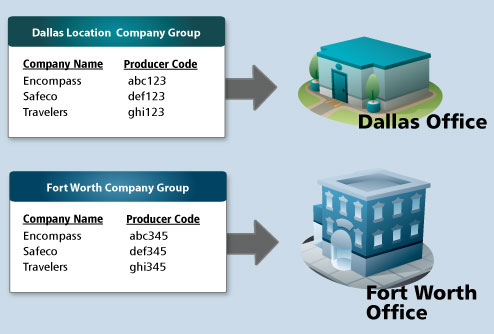
There are situations when an agency may need to have different companies or different producer codes for their producers or locations. For these situations, we have included a "Company Group" feature in TurboRater Web Edition. Company Groups provide the ability for each producer or location to have their own customized set of companies.
For example, agencies that have multiple locations may have separate producer codes for each location. Company Groups can be used to assign different companies and/or producer codes to each location.
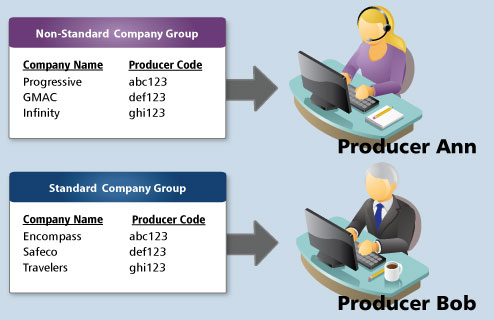
Or an agency may wish to assign different companies and/or producer codes for each producer. As an example, one producer may be responsible to quote all of the non-standard business while the other producer only concentrates on standard or preferred customers. In this situation, the non-standard producer would only need to quote the non-standard companies and vice versa.
In addition to assigning Company Groups to locations as we did in the above example, Company Groups can also assigned to specific producers.
 How do I create a Company Group?
How do I assign a location to a Company Group?
How do I assign a user to a Company Group?
How to Upgrade
How do I create a Company Group?
How do I assign a location to a Company Group?
How do I assign a user to a Company Group?
How to Upgrade
Upgrading to Web Edition is easy.
» If you are currently an Online Quote Storage Subscriber
If you
currently subscribe to our Online Quote Storage, simply download
the
Quick Start Guide for Online Quote Storage Users and you can
start using all of the new features in Web Edition by the end of the
day.
» If you store your own quotes
Contact
an account representative today (800) 383-3482 x189 to learn how
easy it is to upgrade to TurboRater Web Edition.