InsurancePro Monthly Newsletter - August 2010
Downloading Policyholder Information into InsurancePro
With carrier downloads, your InsurancePro database gets populated and updated
automatically with policyholder's transactions, therefore
decreasing the amount of information you have to type in manually.
Downloading policy transactions helps avoid duplicate data
entry, minimizes E&O exposure, and reduces the need for paper.
InsurancePro is designed to download personal auto and homeowner
policyholder data from carriers that use IVANS, TeamUp or FTP.
To begin, you will first need to verify which of your
carriers are certified to download into InsurancePro
How to Setup a Carrier to Download
For carriers that have chosen the FTP or TeamUp method to
download, contact a representative at your carrier for
instructions on how to set up your agency to download with them.
For those carriers that have chosen the IVANS method to
download, refer to our
IVANS Setup Guide for step-by-step instructions or you can
view our
IVANS training video for an overview of the process.
New Download Company Certifications
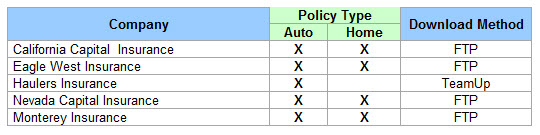
We are constantly certifying new companies to download into InsurancePro. For a complete list, please click
here.
How To Upgrade to InsurancePro 6.0
The upgrade procedure
must
be completed on all computers used to access
InsurancePro. The procedure takes approximately ten
minutes per computer. Every computer must be upgraded
before accessing your InsurancePro database or data corruption
could occur.
To upgrade to InsurancePro 6.0, a subscription to online storage
is required.
To begin the installation procedure, click on the following link
and follow the prompts. If you have already upgraded to
InsurancePro 6.0, no further action will be required on your
part.
http://www.insuranceproonline.com/downloads/ip/v6_0/IPUA/IPUASetup.exe
System Requirements
To view system requirements for IP Version 6.0, please click
here.
Ever Googled your Agency Name?
Ever wonder what exactly makes
up the pieces of the search results you see at Google? Before
that question can be answered, the process of how Google
delivers results must be understood. There are three key
processes in delivering search engine results.
First, Google "crawls" the
world wide web and accumulates information about websites and
their content. The program Google uses to accomplish this task
is referred to as Googelbot. Googlebot uses an algorithmic
process to determine which sites to crawl, and how many pages to
read from each site. Next Google compiles a massive index of
all the words and locations of the sites it crawled.
There are three primary
components that make up a Snippet.
 Title
Title
The
first line of the Snippet is the title. The title displayed
comes from the title of your webpage. We have found many
websites where the designer will overlook this very important
step when designing websites for their customers. WebPages not
titled will appear in search results with the title as
"Untitled" or "Home Page" which does not encourage the consumer
to click and learn more. Whereas a title listing your agency
name and a slogan or short concise description of what your
agency offers would encourage the consumer.
Description
The description listed by Google typically comes from one of
three places.
- Open Directory - If for some reason, when Google
attempts to "crawl" a site and they are unable to read it,
Google will then sometimes rely on the Open Directory
Project, which is listed at
www.dmoz.org
- Within the Page - Sometimes, Google pulls the
description from within the page. Google determines what
part of the page it will use so the description gives some
context as to what the page contains.
- Meta Description Tag - the most preferred method and
where you have the most control of what description is
displayed is the Meta Description Tag which is included in
the code of your website. By including a Meta Description
Tag, you have the ability to dictate what is displayed about
your site.
Descriptive URLs
The last component displayed is the link to your website or the
page on your website that meets the searchers' query. Providing
a descriptive URL is another key aspect to converting a
searcher. For instance, a URL such as
www.sampleinsurancewebsite.com/page.php?id=5134, doesn't
tell the searcher they have landed in the right spot, whereas a
URL such as
http://www.sampleinsurancewebsite.com/automobile/car_insurance_quote.aspx
will.
Internet Marketing ServicesAre you looking to expand your presence online but do not have
the time to do it yourself? Then ITC has an answer for you with
the Insurance Website Builder Advanced SEO Services Plan. With
this new plan, you will have access to your very own Search
Engine Optimization Coordinator that will assist you with all
aspects of your search engine and social networking marketing
campaign. Whether it is setting up your blogs, posting on your Facebook page or submitting press releases on your behalf; we
will make it happen. Each week your SEO specialist will promote
your site on your behalf all over the Internet, with as much or
as little input from you as desired.
Our current customers have enjoyed top placement on Google,
Yahoo and Bing for most of their main keyword phrases. To join
them, contact
Mark Goldsberry today at 800-383-3482
x
160 or email him at
[email protected].