|
Downloads
|
|
Announcing - Hartford Downloads Now Available
|
|
ITC is pleased to announce we have certified Hartford Insurance as one of our download partners for Auto and Home. To begin receiving Hartford downloads into your InsurancePro, either contact Hartford at (877) 322-4833 or feel free to contact our support department at (800)383-3482 option 4.
|
| |
|
Downloading with Progressive
|
|
InsurancePro allows you to do Direct FTP downloads with Progressive and save money! InsurancePro can download with Progressive by the IVANs method, which will generate a charge from Progressive, or the Direct FTP method - which has no charges.
To setup FTP downloading with Progressive, either call Progressive's download support team at (800) 763-6002 or feel free to contact our support department at (800)383-3482 option 4.
|
|
Reminders and Pop-Ups
|
|
Gathering all of the underwriting information needed on a policy can sometimes be a daunting task. Even when agents are diligent and advise their customer of the documentation needed, there always seems to be something that falls through the cracks. And it's those little things that can reek havoc on a policy either by generating an additional premium, or even worse, a cancellation notice.
|
|
|
|
InsurancePro offers simple yet effective tools to track those outstanding underwriting requests and reminders on your insured's accounts.
|
|
|
|
Reminders
|
|
InsurancePro's "Set Reminder" tool allows an agent to specify a future date to follow up on an action item. For instance, if a client says they will fax proof of prior insurance by the end of the day, an agent may want to set a reminder for the following day to verify receipt.
|
|
|
|
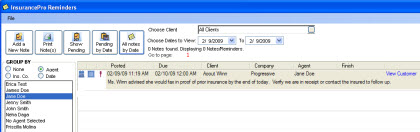
The reminder will appear in three places. First, under the "View Notes/Reminders" section. This report can be run a variety of ways from specific follow-up dates to grouping by categories such as Agent or Insurance Company.
|
| |
|
|
| |
|
|
Second, when accessing the customer's file, a message will appear in the Policy Summary Screen to remind the user the insured has pending reminders.
|
| |
|

|
| |
|
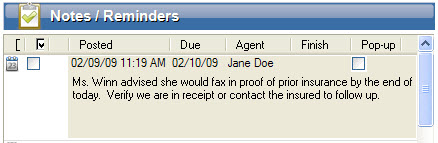
And lastly, the reminder is also included in the client's Notes/Reminders section.
|
| |
|
|
| |
|
Critical Items
|
|
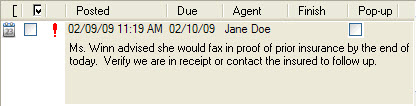
By marking the "Critical" box, a red exclamation point will appear next to the note letting the user know its importance. The red exclamation point will appear both in the View Notes/Reminders section as well as on the note in the client's file.
|
| |
|
|
| |
|
Pop-Up Notes
|
|
|
|
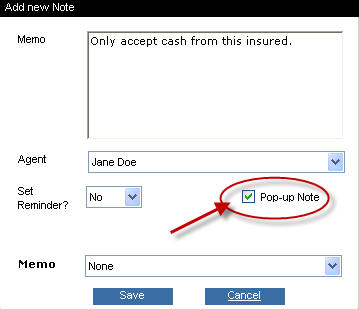
A Pop-Up note is a great tool to use when an agent needs to be reminded of something only when dealing with a particular client. For instance, perhaps a client is known for giving NSF checks. The agent may wish to enter a Pop-Up note to remind all users when accessing this client's file "Only accept cash from this insured."
|
|
|
|
To set a note to Pop-Up, just click the check box below.
|
| |
 |
| |
|
In addition to allowing a user to enter notes on a specific customer's file, InsurancePro takes the Notes/Reminders section a step further by automatically recording certain transactions. When one of the following transactions is performed in InsurancePro, the Notes/Reminders section of the customer's file is automatically noted with the date and time and a description of the transaction.
|
| |
- Printing of any form
- Changing the status of a policy
- When a new business policy is written
- All money transactions
- When receipts are edited
- When checks are written
- When endorsements are logged
- When notes are entered in the Follow-Up section
|
|

|
| |
|
Utilizing the Reminders and Pop-Up features in InsurancePro can avoid unnecessary additional premiums or cancellation notices from being generated, thus increasing your retention. Retaining the policies you put on the books is the most cost effective way to increase your bottom line.
|