|
There are four report types available:
1. Agent Report
Monitors employee's performance
2. Company Report
Monitors performance for each company you represent
3. Policy Type Report
Monitors performance by line of business (i.e. auto, home)
4. Payment Report
Generates reports on payments received or checks written
The Agent, Company, and Policy Type reports can either be summarized or detailed. A summarized report would provide you the sum or percentage of your query. A detailed report would include a list of each policy that meets the criteria specified in your report.
Each of these reports also let you analyze your criteria against the agency as a whole. For instance, you may want to know the percentage of total new business for the agency that one individual agent wrote.
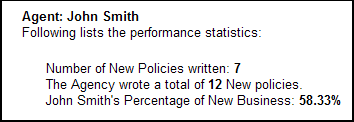
To run a report like the above, select "Agent Report" then "Summarized". Double click on the following fields: Number of New Policies, Show Overall Totals for each selected field, and Show Percentages for each selected field. Double clicking on these fields will cause them to appear in the right box as shown below:

As you can see in the illustration, you have an extensive list of fields you can select from. This offers you the flexibility to manipulate your data and retrieve exactly what data you need.
On the next screen you have several choices. You can identify whether you want to look at every agent's performance or just one in particular. You will need to specify whether you want to select policies by the date written or the effective date. Below that you will identify the time frame you wish to run the report for.
The Company and Policy Type Reports offer similar flexibility as the above in the amount of data available and the steps you take to retrieve it.
The Payment Report allows you to generate reports about payments received or checks written.
Every report you customize can be saved as a template for future use. On the last screen (Step 4), you will see a "Save Template" button. Click this button, name your report, and click Save.
|