Associating Related Policies
Related Policies
InsurancePro creates a new record for each policy an insured carries. This is to ensure the payment histories, notes, and ACORD forms are clearly separated by policy. However, policies can be associated with one another to designate the relationship and to quickly navigate between each policy.
Creating a New Policy for an Existing Customer
Often times when a new policy is generated for an existing customer, much of the information is the same, such as the name, address, and so on. Therefore, under the "Other Policies" section in the Policy Summary Screen, a new policy can be created by duplicating information from the initial policy. After the duplication is complete, the Policy Summary Screen will open, allowing the necessary information to be updated.
Associating Policies
InsurancePro will automatically create a link between policies in the following cases:
When a policy is renewed When a new policy is created using the duplication procedure described above. In the event the policy is not created by one of the above methods, there is the ability to manually associate policies. First, in the Policy Summary Screen, click on the "Other Policies" button. Then select "Associate an existing policy with this client". Select the policy to be associated in the drop down menu.
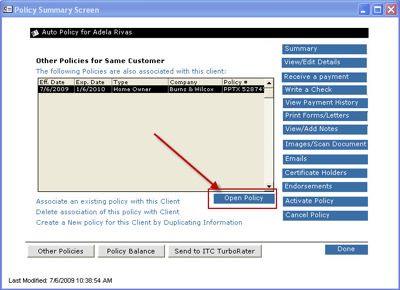
When policies are associated, navigation between them is simple. Just click on "Other Policies", highlight the policy you wish to switch to, and click "Open Policy" as shown below.