Ever Googled Your Insurance Agency Name
Ever wonder what exactly makes up the pieces of the search results you see at
Google? Before that question can be answered, the process of how Google
delivers results must be understood. There are three key processes in delivering
search engine results.
First, Google "crawls" the world wide web and accumulates information about
websites and their content. The program Google uses to accomplish this task is
referred to as Googelbot. Googlebot uses an algorithmic process to determine
which sites to crawl, and how many pages to read from each site. Next Google
compiles a massive index of all the words and locations of the sites it crawled.
When a Google user enters a query, Google returns a
result they feel is most relevant. The results that are displayed are referred
to as Snippets. In general, Google reserves the right to display what they feel
is best for their users. However, you have a great deal of control about what
is displayed about your agency on Google.
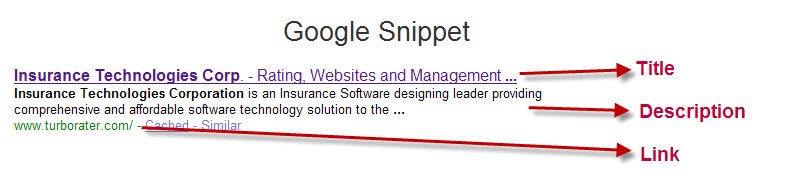
There are three primary components that make up a Snippet.
Title
The first line of the Snippet is the title. The
title displayed comes from the title of your webpage. We have found many
websites where the designer will overlook this very important step when
designing websites for their customers. WebPages not titled will appear in
search results with the title as "Untitled" or "Home Page" which does not
encourage the consumer to click and learn more. Whereas a title listing your
agency name and a slogan or short concise description of what your agency offers
would encourage the consumer.
Description
The description listed by Google typically comes from one of three places.
-
Open Directory - If for some
reason, when Google attempts to "crawl" a site and they are unable to read it,
Google will then sometimes rely on the Open Directory Project, which is listed
at www.dmoz.org
-
Within the Page - Sometimes, Google pulls the
description from within the page. Google determines what part of the page it
will use so the description gives some context as to what the page contains.
-
Meta Description Tag - the most preferred method and
where you have the most control of what description is displayed is the Meta
Description Tag which is included in the code of your website. By including a
Meta Description Tag, you have the ability to dictate what is displayed about
your site.
Descriptive
URLs
The last component displayed
is the link to your website or the page on your website that meets the
searchers' query. Providing a descriptive URL is another key aspect to
converting a searcher. For instance, a URL such as
www.sampleinsurancewebsite.com/page.php?id=5134,
doesn't tell the searcher they have landed in the right spot, whereas a URL such
as
http://www.sampleinsurancewebsite.com/automobile/car_insurance_quote.aspx
will.
Insurance
Website Builder
Every website we design, we include a descriptive title, on-target description,
and all of the URLS quickly identify to the searcher what they contain. In
addition, through our admin console, our users can update their titles and
descriptions at any time and is easy as using any word processor.